Fortress Product Expert
Answered by product specialists with product information and store enquires.

Answered by product specialists with product information and store enquires.

Enquire order status, delivery & installation, post-sales services or member account
Still have other inquiries?
See what others are asking


(Reminder: You can first register as a Fortress eShop member using any email address/phone number, then verify with your corporate staff email to link as a corporate staff account)
 | 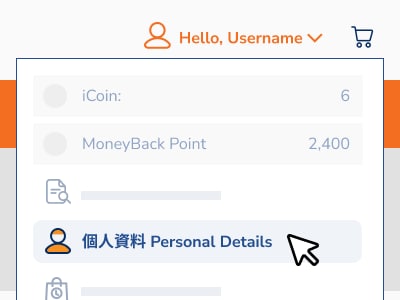 |  |  |
| Register as Member Register as eShop member using any email address or phone number (Skip to next step if already a member) | Go to Personal Details Page to Link After logging in, click "Personal Details" under "My Account" to link as corporate staff account | Select Account Type Under "Link Other Accounts", select "Corporate Staff", enter approved email, and click "Get Verification Code" | Verify Account to Complete Linking Check your email inbox for the verification code, enter it in the "Verification Code" field, then click confirm to complete linking |
 | 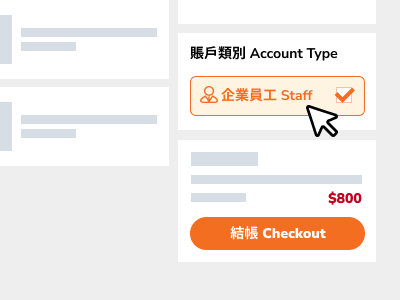 |  | 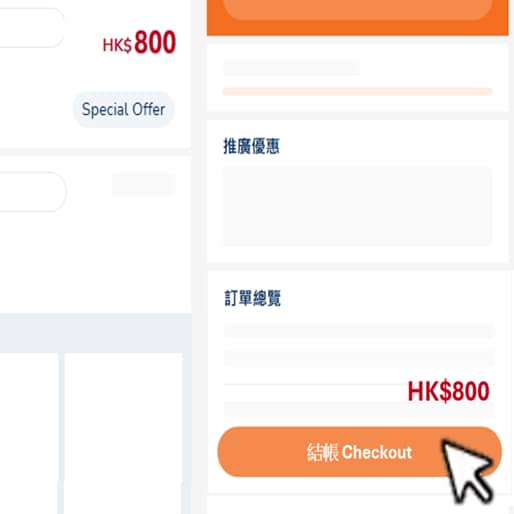 |
| Select Corporate Staff Offer Price Product First add the corporate staff offer price product to your shopping cart | Checkout with Corporate Staff Account On the checkout page, select "Corporate Staff" under "Account Type" | Verify Corporate Staff Account Check your email inbox for the verification code, enter it in the "Verification Code" field, then click confirm | Enjoy Corporate Staff Discount After successful verification, the system will automatically show the offer price. Proceed to checkout to enjoy the corporate staff discount |
Link your corporate staff account, add products to your cart, and the system will automatically display the offer price!
Terms and Conditions:
• All offer products and gifts are available while stocks last.
• Offers are subject to terms and conditions.
• Images are for reference only. In case of any disputes, Fortress reserves the right of final decision.
• Corporate staff account must be registered with an email using the eligible company domain.
• Once your corporate staff account is linked to a main account, it can only be re-linked to another main account after 90 days. If you have not logged in to your account or linked your corporate staff account for over one year, please re-link your corporate account to enjoy the latest offers.